
Unit- 1: Introduction of operating system
An Operating System (OS) is an interface between a computer user and computer hardware.
An operating system (OS) manages all other applications and programs in a computer, and it is loaded into the computer by a boot program.
An operating system is a software which performs all the basic tasks like file management, memory management, process management, handling input and output, and controlling peripheral devices such as disk drives and printers.
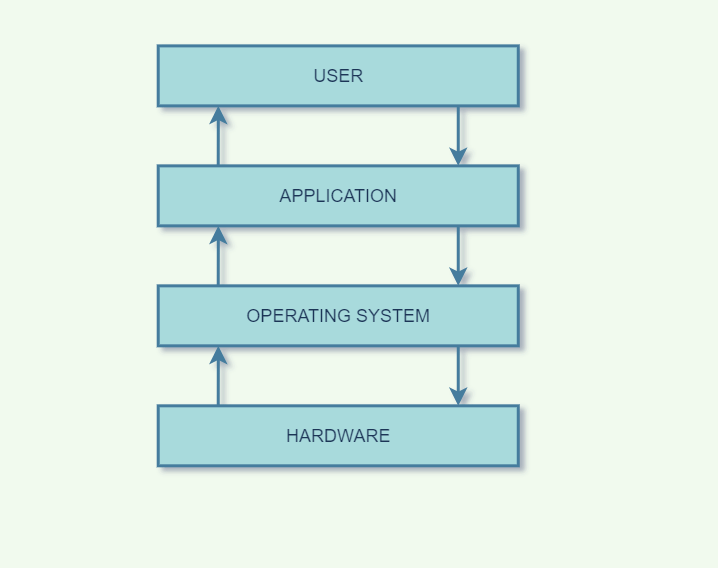
Functions of Operating System
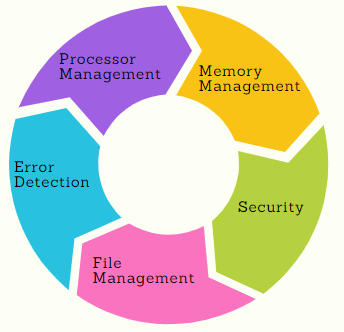
- Processor Management: An operating system manages the processor’s work by allocating various jobs to it and ensuring that each process receives enough time from the processor to function properly.
- Memory Management: An operating system manages the allocation and deallocation of the memory to various processes and ensures that the other process does not consume the memory allocated to one process.
- Device Management: There are various input and output devices. An OS controls the working of these input-output devices
- File Management: An operating system keeps track of information regarding the creation, deletion, transfer, copy, and storage of files in an organized way.
- Security: The operating system provides various techniques which assure the integrity and confidentiality of user data.
- Error Detection: From time to time, the operating system checks the system for any external threat or malicious software activity.
- Job Scheduling: In a multitasking OS where multiple programs run simultaneously, the operating system determines which applications should run in which order and how time should be allocated to each application.
Types of Operating Systems:
1. Batch Operating System
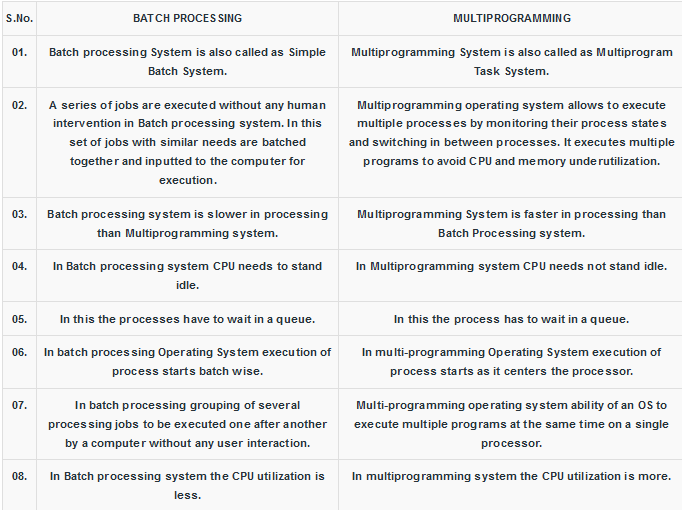
This type of operating system does not interact with the computer directly. There is an operator which takes similar jobs having the same requirement and group them into batches.
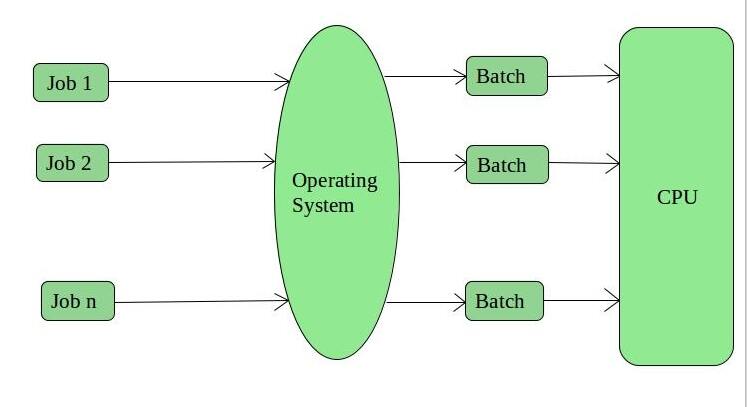
Examples of Batch based Operating System: Payroll System, Bank Statements, etc.
2. Time-Sharing Operating Systems
Each task is given some time to execute so that all the tasks work smoothly. Each user gets the time of CPU as they use a single system. These systems are also known as Multitasking Systems.
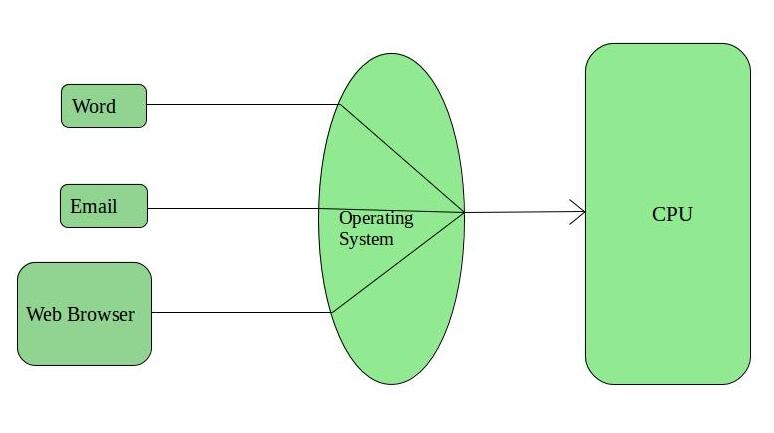
Advantages of Time-Sharing OS:
- Each task gets an equal opportunity
- Fewer chances of duplication of software
- CPU idle time can be reduced
- Resource Sharing: Time-sharing systems allow multiple users to share hardware resources such as the CPU, memory, and peripherals, reducing the cost of hardware and increasing efficiency.
Disadvantages of Time-Sharing OS:
- Reliability problem
- One must have to take care of the security and integrity of user programs and data
- Data communication problem
- Complexity: Time-sharing systems are complex and require advanced software to manage multiple users simultaneously
- Security Risks: With multiple users sharing resources, the risk of security breaches increases.
Distributed System
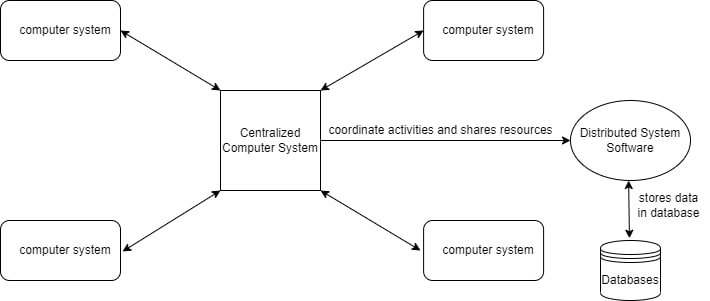
Distributed System is a collection of autonomous computer systems that are physically separated but are connected by a centralized computer network that is equipped with distributed system software.
The autonomous computers will communicate among each system by sharing resources and files and performing the tasks assigned to them.
Applications Area of Distributed System:
- Finance and Commerce: Amazon, eBay, Online Banking, E-Commerce websites.
- Information Society: Search Engines, Wikipedia, Social Networking, Cloud Computing.
- Cloud Technologies: AWS, Salesforce, Microsoft Azure, SAP.
- Entertainment: Online Gaming, Music, youtube.
- Healthcare: Online patient records, Health Informatics.
- Education: E-learning.
- Transport and logistics: GPS, Google Maps.
- Environment Management: Sensor technologies.
Parallel Systems
Parallel Systems are designed to speed up the execution of programs by dividing the programs into multiple fragments and processing these fragments at the same time.
Advantages of Parallel Systems:
- High Performance: Parallel systems can execute computationally intensive tasks more quickly compared to single processor systems.
- Cost Effective: Parallel systems can be more cost-effective compared to distributed systems, as they do not require additional hardware for communication.
Disadvantages of Parallel Systems:
- Limited Scalability: Parallel systems have limited scalability as the number of processors or cores in a single computer is finite.
- Complexity: Parallel systems are more complex to program and debug compared to single processor systems.
Real Time Systems
A real-time operating system (RTOS) is a special-purpose operating system used in computers that has strict time constraints for any job to be performed.
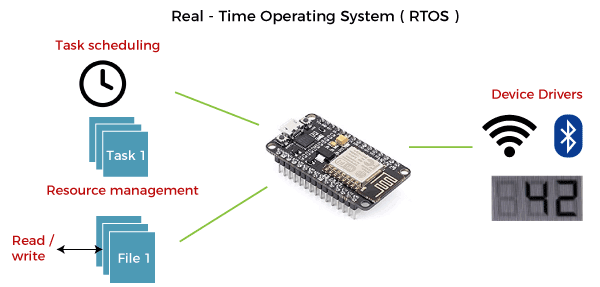
Types of real-time systems based on timing constraints:
- Hard real-time system: This type of system can never miss its deadline. Missing the deadline may have disastrous consequences.
- Soft real-time system: This type of system can miss its deadline occasionally with some acceptably low probability. Missing the deadline have no disastrous consequences.
Memory management
Memory management is the process of controlling and coordinating a computer's main memory. It ensures that blocks of memory space are properly managed and allocated so the operating system (OS)
Swapping
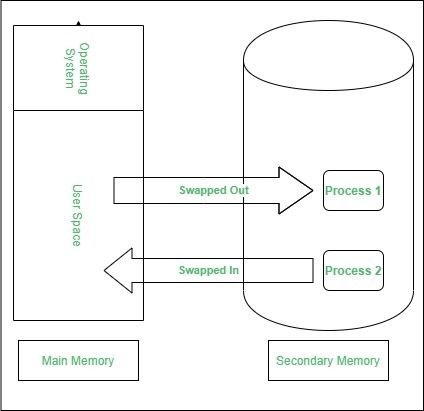
A process needs to be in memory for execution. But sometimes there is not enough main memory to hold all the currently active processes in a time sharing system. So, excess process are kept on disk and brought in to run dynamically.
Swapping is the process of bringing in each process in main memory, running it for a while and then putting it back to the disk.
Contiguous Memory Allocation
In contiguous memory allocation each process is contained in a single contiguous block of memory. Memory is divided into several fixed size partitions. Each partition contains exactly one process. When a partition is free, a process is selected from the input queue and loaded into it. The free blocks of memory are known as holes. The set of holes is searched to determine which hole is best to allocate.
Memory Protection
Memory protection is a phenomenon by which we control memory access rights on a computer. The main aim of it is to prevent a process from accessing memory that has not been allocated to it. Hence prevents a bug within a process from affecting other processes, or the operating system itself, and instead results in a segmentation fault or storage violation exception being sent to the disturbing process, generally killing of process.
Memory Allocation
Memory allocation is a process by which computer programs are assigned memory or space. It is of three types :
- First Fit:The first hole that is big enough is allocated to program.
- Best Fit:The smallest hole that is big enough is allocated to program.
- Worst Fit:The largest hole that is big enough is allocated to program.
Fragmentation
Fragmentation occurs in a dynamic memory allocation system when most of the free blocks are too small to satisfy any request. It is generally termed as inability to use the available memory.
In such situation processes are loaded and removed from the memory. As a result of this, free holes exists to satisfy a request but is non contiguous i.e. the memory is fragmented into large no. Of small holes. This phenomenon is known as External Fragmentation.
Also, at times the physical memory is broken into fixed size blocks and memory is allocated in unit of block sizes. The memory allocated to a space may be slightly larger than the requested memory. The difference between allocated and required memory is known as Internal fragmentation i.e. the memory that is internal to a partition but is of no use.
Paging
A solution to fragmentation problem is Paging. Paging is a memory management mechanism that allows the physical address space of a process to be non-contagious. Here physical memory is divided into blocks of equal size called Pages. The pages belonging to a certain process are loaded into available memory frames.
Page Table
A Page Table is the data structure used by a virtual memory system in a computer operating system to store the mapping between virtual address and physical addresses.
Virtual address is also known as Logical address and is generated by the CPU. While Physical address is the address that actually exists on memory.
Segmentation
Segmentation is another memory management scheme that supports the user-view of memory. Segmentation allows breaking of the virtual address space of a single process into segments that may be placed in non-contiguous areas of physical memory.
Segmentation with Paging
Both paging and segmentation have their advantages and disadvantages, it is better to combine these two schemes to improve on each. The combined scheme is known as ‘Page the Elements’. Each segment in this scheme is divided into pages and each segment is maintained in a page table. So the logical address is divided into following 3 parts :
- Segment numbers(S)
- Page number (P)
- The displacement or offset number (D)
bcanotes bca notes bcaquestionpaper
bcanotes bca notes bcaquestionpaper bca questionpaper bcanotes bca notes bcaquestionpaper bca questionpaper bcanotes bca bcanotes bcaquestionpaper bca questionpaper bcanotes bca notes bcaquestionpaper bca questionpaper
bcanotes bca notes bcaquestionpaper bca questionpaperbcanotes bca notes bcaquestionpaper bca questionpaper bcanotes bca notes bcaquestionpaper bca questionpaperbcanotes bca notes bcaquestionpaper bca questionpaper bcanotes bca notes bcaquestionpaper bca questionpaper bcanotes bca notes bcaquestionpaper bca questionpaper bcanotes bca notes bcaquestionpaper bca questionpaper bcanotes bca notes bcaquestionpaper bca questionpaper ccsu ccsunotes ccsu bca cccsu notes ccsubcaquestionpaper bca questionpaperbcanotes
Visit W3Schools.com!Visit W3Schools.com!Visit W3Schools.com!Visit W3Schools.com!Visit W3Schools.com!Visit W3Schools.com!Visit W3Schools.com!Visit W3Schools.com!Visit W3Schools.com!ccsubcanotes ccsu bca cccsu notes ccsubcaquestionpaper bca questionpaperbcanotes ccsubcanotes ccsu bca cccsu notes ccsubcaquestionpaper bca questionpaperbcanotes bcanotes bca notes bcaquestionpaper bca questionpaper
bcanotes bca notes bcaquestionpaper bca questionpaper bcanotes bca notes bcaquestionpaper bca questionpaper bcanotes bca notes bcaquestionpaper bca questionpaper
ccsubcanotes ccsu bca cccsu notes ccsubcaquestionpaper bca questionpaper ccsubcanotes ccsu bca cccsu notes ccsubcaquestionpaper bca questionpaper ccsubcanotes ccsu bca cccsu notes ccsubcaquestionpaper bca questionpaper ccsubcanotes ccsu bca cccsu notes ccsubcaquestionpaper bca questionpaper ccsubcanotes ccsu bca cccsu notes ccsubcaquestionpaper bca questionpaper ccsubcanotes ccsu bca cccsu notes ccsubcaquestionpaper bca questionpaperbcanotes
ccsubcanotes ccsu bca cccsu notes ccsubcaquestionpaper bca questionpaper ccsubcanotes ccsu bca cccsu notes ccsubcaquestionpaper bca questionpaper ccsubcanotes ccsu bca cccsu notes ccsubcaquestionpaper bca questionpaper ccsubcanotes ccsu bca cccsu notes ccsubcaquestionpaper bca questionpaper ccsubcanotes ccsu bca cccsu notes ccsubcaquestionpaper bca questionpaper ccsubcanotes ccsu bca cccsu notes ccsubcaquestionpaper bca questionpaperbcanotes
bcanotes bca notes bcaquestionpaper bca questionpaper bcanotes bca notes bcaquestionpaper bca questionpaper
bcanotes bca notes bcaquestionpaper bca questionpaperbcanotes bca notes bcaquestionpaper bca questionpaper bcanotes bca notes bcaquestionpaper bca questionpaperbcanotes bca notes bcaquestionpaper bca questionpaper bcanotes bca notes bcaquestionpaper bca questionpaper bcanotes bca notes bcaquestionpaper bca questionpaper bcanotes bca notes bcaquestionpaper bca questionpaper bcanotes bca notes bcaquestionpaper bca questionpaper ccsubcanotes ccsu bca cccsu notes ccsubcaquestionpaper bca questionpaperbcanotes
ccsubcanotes ccsu bca cccsu notes ccsubcaquestionpaper bca questionpaperbcanotes ccsubcanotes ccsu bca cccsu notes ccsubcaquestionpaper bca questionpaperbcanotes bcanotes bca notes bcaquestionpaper bca questionpaper
bcanotes bca notes bcaquestionpaper bca questionpaper bcanotes bca notes bcaquestionpaper bca questionpaper bcanotes bca notes bcaquestionpaper bca questionpaper
ccsubcanotes ccsu bca cccsu notes ccsubcaquestionpaper bca questionpaper ccsubcanotes ccsu bca cccsu notes ccsubcaquestionpaper bca questionpaper ccsubcanotes ccsu bca cccsu notes ccsubcaquestionpaper bca questionpaper ccsubcanotes ccsu bca cccsu notes ccsubcaquestionpaper bca questionpaper ccsubcanotes ccsu bca cccsu notes ccsubcaquestionpaper bca questionpaper ccsubcanotes ccsu bca cccsu notes ccsubcaquestionpaper bca questionpaperbcanotes
ccsubcanotes ccsu bca cccsu notes ccsubcaquestionpaper bca questionpaper ccsubcanotes ccsu bca cccsu notes ccsubcaquestionpaper bca questionpaper ccsubcanotes ccsu bca cccsu notes ccsubcaquestionpaper bca questionpaper ccsubcanotes ccsu bca cccsu notes ccsubcaquestionpaper bca questionpaper ccsubcanotes ccsu bca cccsu notes ccsubcaquestionpaper bca questionpaper ccsubcanotes ccsu bca cccsu notes ccsubcaquestionpaper bca questionpaperbcanotes
bcanotes bca notes bcaquestionpaper bca questionpaper bcanotes bca notes bcaquestionpaper bca questionpaper
bcanotes bca notes bcaquestionpaper bca questionpaperbcanotes bca notes bcaquestionpaper bca questionpaper bcanotes bca notes bcaquestionpaper bca questionpaperbcanotes bca notes bcaquestionpaper bca questionpaper bcanotes bca notes bcaquestionpaper bca questionpaper bcanotes bca notes bcaquestionpaper bca questionpaper bcanotes bca notes bcaquestionpaper bca questionpaper bcanotes bca notes bcaquestionpaper bca questionpaper ccsubcanotes ccsu bca cccsu notes ccsubcaquestionpaper bca questionpaperbcanotes
ccsubcanotes ccsu bca cccsu notes ccsubcaquestionpaper bca questionpaperbcanotes ccsubcanotes ccsu bca cccsu notes ccsubcaquestionpaper bca questionpaperbcanotes bcanotes bca notes bcaquestionpaper bca questionpaper
bcanotes bca notes bcaquestionpaper bca questionpaper bcanotes bca notes bcaquestionpaper bca questionpaper bcanotes bca notes bcaquestionpaper bca questionpaper
ccsubcanotes ccsu bca cccsu notes ccsubcaquestionpaper bca questionpaper ccsubcanotes ccsu bca cccsu notes ccsubcaquestionpaper bca questionpaper ccsubcanotes ccsu bca cccsu notes ccsubcaquestionpaper bca questionpaper ccsubcanotes ccsu bca cccsu notes ccsubcaquestionpaper bca questionpaper ccsubcanotes ccsu bca cccsu notes ccsubcaquestionpaper bca questionpaper ccsubcanotes ccsu bca cccsu notes ccsubcaquestionpaper bca questionpaperbcanotes
ccsubcanotes ccsu bca cccsu notes ccsubcaquestionpaper bca questionpaper ccsubcanotes ccsu bca cccsu notes ccsubcaquestionpaper bca questionpaper ccsubcanotes ccsu bca cccsu notes ccsubcaquestionpaper bca questionpaper ccsubcanotes ccsu bca cccsu notes ccsubcaquestionpaper bca questionpaper ccsubcanotes ccsu bca cccsu notes ccsubcaquestionpaper bca questionpaper ccsubcanotes ccsu bca cccsu notes ccsubcaquestionpaper bca questionpaperbcanotes
bcanotes bca notes bcaquestionpaper bca questionpaper bcanotes bca notes bcaquestionpaper bca questionpaper
bcanotes bca notes bcaquestionpaper bca questionpaperbcanotes bca notes bcaquestionpaper bca questionpaper bcanotes bca notes bcaquestionpaper bca questionpaperbcanotes bca notes bcaquestionpaper bca questionpaper bcanotes bca notes bcaquestionpaper bca questionpaper bcanotes bca notes bcaquestionpaper bca questionpaper bcanotes bca notes bcaquestionpaper bca questionpaper bcanotes bca notes bcaquestionpaper bca questionpaper ccsubcanotes ccsu bca cccsu notes ccsubcaquestionpaper bca questionpaperbcanotes
ccsubcanotes ccsu bca cccsu notes ccsubcaquestionpaper bca questionpaperbcanotes ccsubcanotes ccsu bca cccsu notes ccsubcaquestionpaper bca questionpaperbcanotes bcanotes bca notes bcaquestionpaper bca questionpaper
bcanotes bca notes bcaquestionpaper bca questionpaper bcanotes bca notes bcaquestionpaper bca questionpaper bcanotes bca notes bcaquestionpaper bca questionpaper
ccsubcanotes ccsu bca cccsu notes ccsubcaquestionpaper bca questionpaper ccsubcanotes ccsu bca cccsu notes ccsubcaquestionpaper bca questionpaper ccsubcanotes ccsu bca cccsu notes ccsubcaquestionpaper bca questionpaper ccsubcanotes ccsu bca cccsu notes ccsubcaquestionpaper bca questionpaper ccsubcanotes ccsu bca cccsu notes ccsubcaquestionpaper bca questionpaper ccsubcanotes ccsu bca cccsu notes ccsubcaquestionpaper bca questionpaperbcanotes
ccsubcanotes ccsu bca cccsu notes ccsubcaquestionpaper bca questionpaper ccsubcanotes ccsu bca cccsu notes ccsubcaquestionpaper bca questionpaper ccsubcanotes ccsu bca cccsu notes ccsubcaquestionpaper bca questionpaper ccsubcanotes ccsu bca cccsu notes ccsubcaquestionpaper bca questionpaper ccsubcanotes ccsu bca cccsu notes ccsubcaquestionpaper bca questionpaper ccsubcanotes ccsu bca cccsu notes ccsubcaquestionpaper bca questionpaperbcanotes