
Unit-2: Useful technologies related to computer graphics
Hardcopy Technologies
A hard copy is a printed copy of information from a computer. Sometimes it refers to a printer, so it is called a hard copy because it exists as a physical object
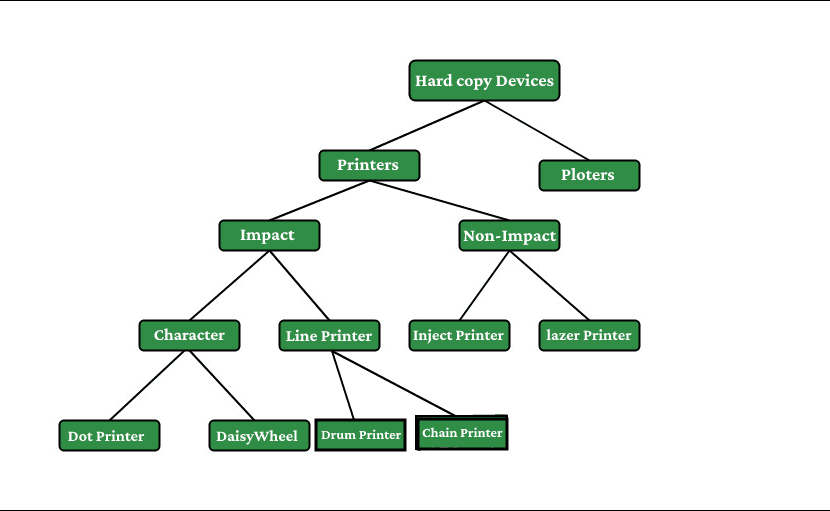
Output Devices
It is an electromechanical device, which accepts data from a computer and translates them into form understand by users.
Following are Output Devices:
- Printers
- Plotters
Printers:
Printer is the most important output device, which is used to print data on paper.
1. Impact Printers: The printers that print the characters by striking against the ribbon and onto the papers are known as Impact Printers.
These Printers are of two types:
- Character Printers
- Line Printers
2. Non-Impact Printers: The printers that print the characters without striking against the ribbon and onto the papers are called Non-Impact Printers. These printers print a complete page at a time, therefore, also known as Page Printers.
Page Printers are of two types:
- Laser Printers
- Inkjet Printers
LASER PRINTER : laser printer is a type of printer which makes use of a laser beam to produce an image on the drum or you can say that it is a printer that makes use of a focused beam of light to transfer text and images onto paper. Laser printer makes use of laser technology for the printing of copies onto the paper.
INKJET PRINTER : Inkjet printers are a category of printer in which printing is done with the help of inkjet technology. The technology works by spraying ionized ink directed by magnetic plates onto the paper, which is fed through the printer.
DISPLAY TECHNOLOGIES
Display is a device used to present visual information. The main aim of any display technology is to simplify the information sharing.
Today, there are different types of displays used for different applications.
• Cathode Ray Tubes
• Flat Panel Displays
• Electroluminescence Displays
• LCD Displays
• Active Matrix TFT
• Light Valves
• Micro mirror devices.
Cathode Ray Tubes (CRTs)
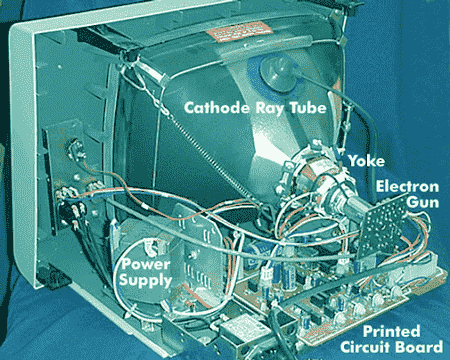
A cathode-ray tube (CRT) is a specialized vacuum tube in which images are produced when an electron beam strikes a phosphorescent surface.
Most desktop computer displays make use of CRTs.
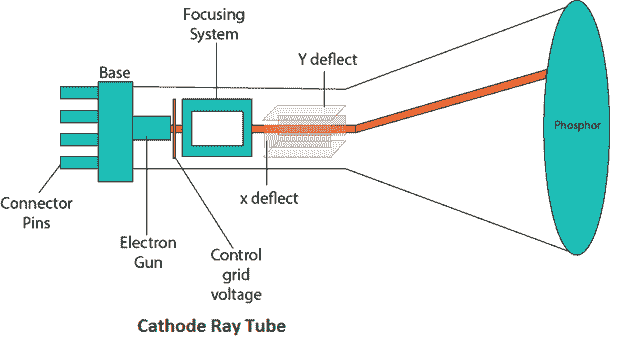
Raster Scan Display:
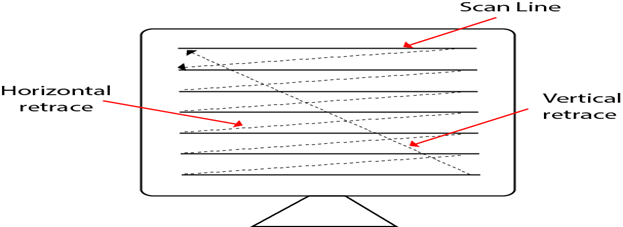
A Raster Scan Display is based on intensity control of pixels in the form of a rectangular box called Raster on the screen. Information of on and off pixels is stored in refresh buffer or Frame buffer. Televisions in our house are based on Raster Scan Method.
Random Scan Display
Random Scan System uses an electron beam which operates like a pencil to create a line image on the CRT screen.
The picture is constructed out of a sequence of straight-line segments. Each line segment is drawn on the screen by directing the beam to move from one point on the screen to the next,
where its x & y coordinates define each point. After drawing the picture. The system cycles back to the first line and design all the lines of the image 30 to 60 time each second. The process is shown in fig:
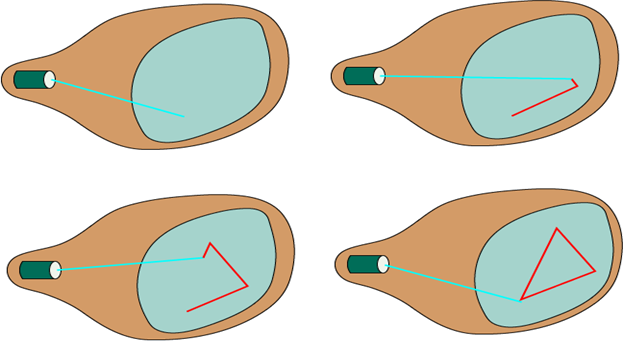
Read Random Scan and Raster Scan Display
Random-Scan Display Processors:
Input in the form of an application program is stored in the system memory along with graphics package.
Graphics package translates the graphic commands in application program into a display file stored in system memory.
This display file is then accessed by the display processor to refresh the screen.
The display processor cycles through each command in the display file program. Sometimes the display processor in a random-scan is referred as Display Processing Unit / Graphics Controller.
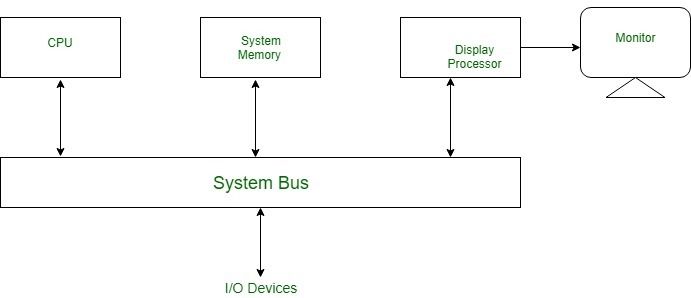
VIDEO CONTROLLER:
A video controller, often referred to as a video or graphics card, is a key hardware component that allows computers to generate graphic .
information to any video display devices, such as a monitor or projector. They are also known as graphics or video adapters.
Some modern computers do not include video cards, but rather have graphics processing units directly integrated into the computer’s motherboard.
Following are some of the important input devices which are used in a computer −
- Keyboard
- Mouse
- Joy Stick
- Light pen
- Track Ball
- Scanner
WORKING EXPOSURE
‘Working exposure’ means ‘working for free’ in exchange for exposure or experience.
Dreamweaver is Adobe’s flagship tool, which primarily focuses on creating and editing HTML and CSS, while giving a preview of the output.
Web designing and application deveopment can be done simultaneously, with real-time checking and editing.
Clipping
Clipping is the process of drawing pixels only to a selected region or well-defined window.
Cohen–Sutherland algorithm
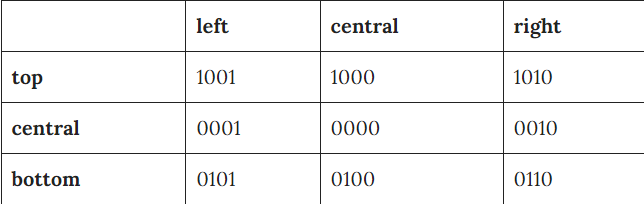
In this algorithm, we are given 9 regions on the screen.
Out of which one region is of the window and the rest 8 regions are around it given by 4 digit binary. The division of the regions are based on (x_max, y_max) and (x_min, y_min).
The central part is the viewing region or window, all the lines which lie within this region are completely visible. A region code is always assigned to the endpoints of the given line.
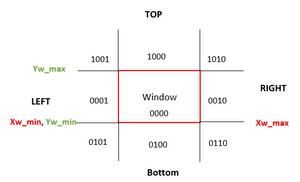
Formula to check binary digits:- TBRL which can be defined as top, bottom, right, and left accordingly.
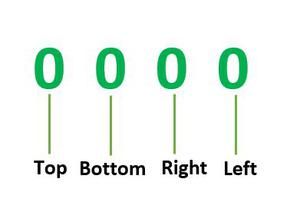
read advantage and disadvantage
A line can be drawn:
a) Inside the Window, if that is the case, then no clipping is required
b) Completely outside the Window, if that is the case, then no clipping is required because entire line isn’t in the window.
c) Partially inside or outside the window, if that is the case, then we need to find the intersection point and clipping would take place.
Cyrus–Beck algorithm
Cyrus Beck is a line clipping algorithm that is made for convex polygons.
It allows line clipping for non-rectangular windows like triangle polygons etc.
unlike Cohen Sutherland It also removes the repeated clipping needed in Cohen Sutherland.
Midpoint Subdivision Algorithm
It is used for clipping line. The line is divided in two parts. Mid points of line is obtained by dividing it in two short segments.
Again division is done, by finding midpoint. This process is continued until line of visible and invisible category is obtained.

ASK IN COMMENT SECTION
bcanotes bca notes bcaquestionpaper
bcanotes bca notes bcaquestionpaper bca questionpaper bcanotes bca notes bcaquestionpaper bca questionpaper bcanotes bca bcanotes bcaquestionpaper bca questionpaper bcanotes bca notes bcaquestionpaper bca questionpaper
bcanotes bca notes bcaquestionpaper bca questionpaperbcanotes bca notes bcaquestionpaper bca questionpaper bcanotes bca notes bcaquestionpaper bca questionpaperbcanotes bca notes bcaquestionpaper bca questionpaper bcanotes bca notes bcaquestionpaper bca questionpaper bcanotes bca notes bcaquestionpaper bca questionpaper bcanotes bca notes bcaquestionpaper bca questionpaper bcanotes bca notes bcaquestionpaper bca questionpaper ccsu ccsunotes ccsu bca cccsu notes ccsubcaquestionpaper bca questionpaperbcanotes
Visit W3Schools.com!Visit W3Schools.com!Visit W3Schools.com!Visit W3Schools.com!Visit W3Schools.com!Visit W3Schools.com!Visit W3Schools.com!Visit W3Schools.com!Visit W3Schools.com!ccsubcanotes ccsu bca cccsu notes ccsubcaquestionpaper bca questionpaperbcanotes ccsubcanotes ccsu bca cccsu notes ccsubcaquestionpaper bca questionpaperbcanotes bcanotes bca notes bcaquestionpaper bca questionpaper
bcanotes bca notes bcaquestionpaper bca questionpaper bcanotes bca notes bcaquestionpaper bca questionpaper bcanotes bca notes bcaquestionpaper bca questionpaper
ccsubcanotes ccsu bca cccsu notes ccsubcaquestionpaper bca questionpaper ccsubcanotes ccsu bca cccsu notes ccsubcaquestionpaper bca questionpaper ccsubcanotes ccsu bca cccsu notes ccsubcaquestionpaper bca questionpaper ccsubcanotes ccsu bca cccsu notes ccsubcaquestionpaper bca questionpaper ccsubcanotes ccsu bca cccsu notes ccsubcaquestionpaper bca questionpaper ccsubcanotes ccsu bca cccsu notes ccsubcaquestionpaper bca questionpaperbcanotes
ccsubcanotes ccsu bca cccsu notes ccsubcaquestionpaper bca questionpaper ccsubcanotes ccsu bca cccsu notes ccsubcaquestionpaper bca questionpaper ccsubcanotes ccsu bca cccsu notes ccsubcaquestionpaper bca questionpaper ccsubcanotes ccsu bca cccsu notes ccsubcaquestionpaper bca questionpaper ccsubcanotes ccsu bca cccsu notes ccsubcaquestionpaper bca questionpaper ccsubcanotes ccsu bca cccsu notes ccsubcaquestionpaper bca questionpaperbcanotes
bcanotes bca notes bcaquestionpaper bca questionpaper bcanotes bca notes bcaquestionpaper bca questionpaper
bcanotes bca notes bcaquestionpaper bca questionpaperbcanotes bca notes bcaquestionpaper bca questionpaper bcanotes bca notes bcaquestionpaper bca questionpaperbcanotes bca notes bcaquestionpaper bca questionpaper bcanotes bca notes bcaquestionpaper bca questionpaper bcanotes bca notes bcaquestionpaper bca questionpaper bcanotes bca notes bcaquestionpaper bca questionpaper bcanotes bca notes bcaquestionpaper bca questionpaper ccsubcanotes ccsu bca cccsu notes ccsubcaquestionpaper bca questionpaperbcanotes
ccsubcanotes ccsu bca cccsu notes ccsubcaquestionpaper bca questionpaperbcanotes ccsubcanotes ccsu bca cccsu notes ccsubcaquestionpaper bca questionpaperbcanotes bcanotes bca notes bcaquestionpaper bca questionpaper
bcanotes bca notes bcaquestionpaper bca questionpaper bcanotes bca notes bcaquestionpaper bca questionpaper bcanotes bca notes bcaquestionpaper bca questionpaper
ccsubcanotes ccsu bca cccsu notes ccsubcaquestionpaper bca questionpaper ccsubcanotes ccsu bca cccsu notes ccsubcaquestionpaper bca questionpaper ccsubcanotes ccsu bca cccsu notes ccsubcaquestionpaper bca questionpaper ccsubcanotes ccsu bca cccsu notes ccsubcaquestionpaper bca questionpaper ccsubcanotes ccsu bca cccsu notes ccsubcaquestionpaper bca questionpaper ccsubcanotes ccsu bca cccsu notes ccsubcaquestionpaper bca questionpaperbcanotes
ccsubcanotes ccsu bca cccsu notes ccsubcaquestionpaper bca questionpaper ccsubcanotes ccsu bca cccsu notes ccsubcaquestionpaper bca questionpaper ccsubcanotes ccsu bca cccsu notes ccsubcaquestionpaper bca questionpaper ccsubcanotes ccsu bca cccsu notes ccsubcaquestionpaper bca questionpaper ccsubcanotes ccsu bca cccsu notes ccsubcaquestionpaper bca questionpaper ccsubcanotes ccsu bca cccsu notes ccsubcaquestionpaper bca questionpaperbcanotes
bcanotes bca notes bcaquestionpaper bca questionpaper bcanotes bca notes bcaquestionpaper bca questionpaper
bcanotes bca notes bcaquestionpaper bca questionpaperbcanotes bca notes bcaquestionpaper bca questionpaper bcanotes bca notes bcaquestionpaper bca questionpaperbcanotes bca notes bcaquestionpaper bca questionpaper bcanotes bca notes bcaquestionpaper bca questionpaper bcanotes bca notes bcaquestionpaper bca questionpaper bcanotes bca notes bcaquestionpaper bca questionpaper bcanotes bca notes bcaquestionpaper bca questionpaper ccsubcanotes ccsu bca cccsu notes ccsubcaquestionpaper bca questionpaperbcanotes
ccsubcanotes ccsu bca cccsu notes ccsubcaquestionpaper bca questionpaperbcanotes ccsubcanotes ccsu bca cccsu notes ccsubcaquestionpaper bca questionpaperbcanotes bcanotes bca notes bcaquestionpaper bca questionpaper
bcanotes bca notes bcaquestionpaper bca questionpaper bcanotes bca notes bcaquestionpaper bca questionpaper bcanotes bca notes bcaquestionpaper bca questionpaper
ccsubcanotes ccsu bca cccsu notes ccsubcaquestionpaper bca questionpaper ccsubcanotes ccsu bca cccsu notes ccsubcaquestionpaper bca questionpaper ccsubcanotes ccsu bca cccsu notes ccsubcaquestionpaper bca questionpaper ccsubcanotes ccsu bca cccsu notes ccsubcaquestionpaper bca questionpaper ccsubcanotes ccsu bca cccsu notes ccsubcaquestionpaper bca questionpaper ccsubcanotes ccsu bca cccsu notes ccsubcaquestionpaper bca questionpaperbcanotes
ccsubcanotes ccsu bca cccsu notes ccsubcaquestionpaper bca questionpaper ccsubcanotes ccsu bca cccsu notes ccsubcaquestionpaper bca questionpaper ccsubcanotes ccsu bca cccsu notes ccsubcaquestionpaper bca questionpaper ccsubcanotes ccsu bca cccsu notes ccsubcaquestionpaper bca questionpaper ccsubcanotes ccsu bca cccsu notes ccsubcaquestionpaper bca questionpaper ccsubcanotes ccsu bca cccsu notes ccsubcaquestionpaper bca questionpaperbcanotes
bcanotes bca notes bcaquestionpaper bca questionpaper bcanotes bca notes bcaquestionpaper bca questionpaper
bcanotes bca notes bcaquestionpaper bca questionpaperbcanotes bca notes bcaquestionpaper bca questionpaper bcanotes bca notes bcaquestionpaper bca questionpaperbcanotes bca notes bcaquestionpaper bca questionpaper bcanotes bca notes bcaquestionpaper bca questionpaper bcanotes bca notes bcaquestionpaper bca questionpaper bcanotes bca notes bcaquestionpaper bca questionpaper bcanotes bca notes bcaquestionpaper bca questionpaper ccsubcanotes ccsu bca cccsu notes ccsubcaquestionpaper bca questionpaperbcanotes
ccsubcanotes ccsu bca cccsu notes ccsubcaquestionpaper bca questionpaperbcanotes ccsubcanotes ccsu bca cccsu notes ccsubcaquestionpaper bca questionpaperbcanotes bcanotes bca notes bcaquestionpaper bca questionpaper
bcanotes bca notes bcaquestionpaper bca questionpaper bcanotes bca notes bcaquestionpaper bca questionpaper bcanotes bca notes bcaquestionpaper bca questionpaper
ccsubcanotes ccsu bca cccsu notes ccsubcaquestionpaper bca questionpaper ccsubcanotes ccsu bca cccsu notes ccsubcaquestionpaper bca questionpaper ccsubcanotes ccsu bca cccsu notes ccsubcaquestionpaper bca questionpaper ccsubcanotes ccsu bca cccsu notes ccsubcaquestionpaper bca questionpaper ccsubcanotes ccsu bca cccsu notes ccsubcaquestionpaper bca questionpaper ccsubcanotes ccsu bca cccsu notes ccsubcaquestionpaper bca questionpaperbcanotes
ccsubcanotes ccsu bca cccsu notes ccsubcaquestionpaper bca questionpaper ccsubcanotes ccsu bca cccsu notes ccsubcaquestionpaper bca questionpaper ccsubcanotes ccsu bca cccsu notes ccsubcaquestionpaper bca questionpaper ccsubcanotes ccsu bca cccsu notes ccsubcaquestionpaper bca questionpaper ccsubcanotes ccsu bca cccsu notes ccsubcaquestionpaper bca questionpaper ccsubcanotes ccsu bca cccsu notes ccsubcaquestionpaper bca questionpaperbcanotes