
📝Short Notes on Computer graphic
Computer graphics
Computer graphics is an art of drawing pictures on computer screens with the help of programming. It involves computations, creation, and manipulation of data.
In other words, we can say that computer graphics is a rendering tool for the generation and manipulation of images.
Applications of computer graphic
Computer Art - commercial art animation packages, paint packages
Computer Aided Drawing- Designing of buildings, automobile, aircraft
Presentation Graphics- research reports, managerial reports,
Entertainment-movie industry and game industry.
Education - teaching-
Training-training like simulators
Scan Converting a Straight Line
Algorithms for line Drawing:
- Direct use of line equation
- DDA (Digital Differential Analyzer)
- Bresenham's Algorithm
Direct Method
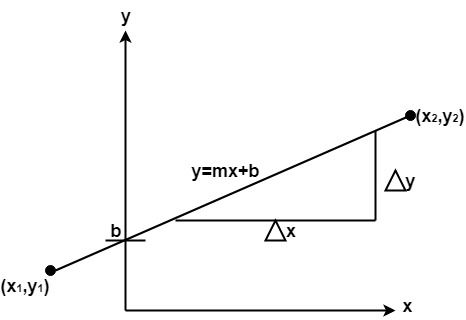
In this algorithm, we have two endpoints. We find the slope of the line by using both the points, and we put the slope in the line equation y = mx + b.
Then we find the value of b by putting x and y equal to 0. After this, we have a relation between x and y. Now we increase the value of x and find the corresponding value of y.
DDA (Digital Differential Analyzer) Algorithm
DDA stands for Digital Differential Analyzer. It is an incremental method of scan conversion of line. In this method calculation is performed at each step but by using results of previous steps.
Advantage:
- It is a faster method than method of using direct use of line equation.
- This method does not use multiplication theorem.
- It allows us to detect the change in the value of x and y ,so plotting of same point twice is not possible.
- This method gives overflow indication when a point is repositioned.
- It is an easy method because each step involves just two additions.
Disadvantage:
- It involves floating point additions rounding off is done. Accumulations of round off error cause accumulation of error.
- Rounding off operations and floating point operations consumes a lot of time.
- It is more suitable for generating line using the software. But it is less suited for hardware implementation.
Bresenham's Line Algorithm
This algorithm is used for scan converting a line. It was developed by Bresenham.
It is an efficient method because it involves only integer addition, subtractions, and multiplication operations.
These operations can be performed very rapidly so lines can be generated quickly.
In this method, next pixel selected is that one who has the least distance from true line.
Advantage
1. It involves only integer arithmetic, so it is simple.
2. It avoids the generation of duplicate points.
3. It can be implemented using hardware because it does not use multiplication and division.
4. It is faster as compared to DDA (Digital Differential Analyzer) because it does not involve floating point calculations like DDA Algorithm.
Disadvantage
1. This algorithm is meant for basic line drawing only Initializing is not a part of Bresenham's line algorithm. So to draw smooth lines, you should want to look into a different algorithm.
Raster images
Raster images are compiled using pixels, or tiny dots, containing unique color and tonal information that come together to create the image.
Vector images
Vector artwork is art that's made up of vector graphics. These graphics are points, lines, curves and shapes that are based on mathematical formulas. When you scale a vector image file, it isn't low resolution and there's no loss of quality, so it can be sized to however large or small you need it to be.
Raster Scan Display:
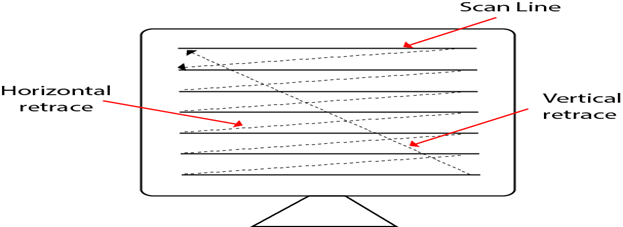
A Raster Scan Display is based on intensity control of pixels in the form of a rectangular box called Raster on the screen.
Information of on and off pixels is stored in refresh buffer or Frame buffer. Televisions in our house are based on Raster Scan Method.
Random Scan Display
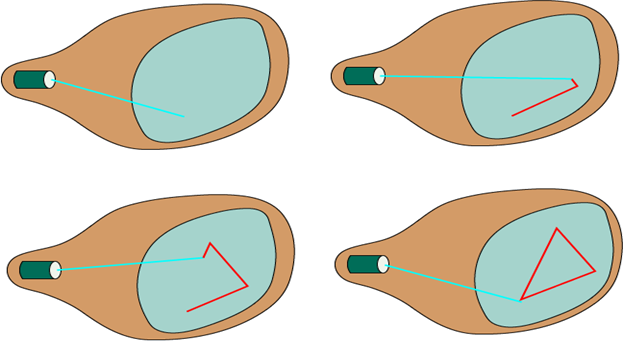
Random Scan System uses an electron beam which operates like a pencil to create a line image on the CRT screen.
Clipping
Clipping is the process of drawing pixels only to a selected region or well-defined window.
Types of Clipping:
- Point Clipping
- Line Clipping
- Area Clipping (Polygon)
- Curve Clipping
- Text Clipping
- Exterior Clipping
Line Clipping Algorithms
- Cohen-Sutherland Line Clippings
- Cyrus-Beck Line Clipping Algorithm
Polygon Clipping
- Sutherland Hodgman Algorithm
Read in details clipping algorithm
Window to Viewport Transformation
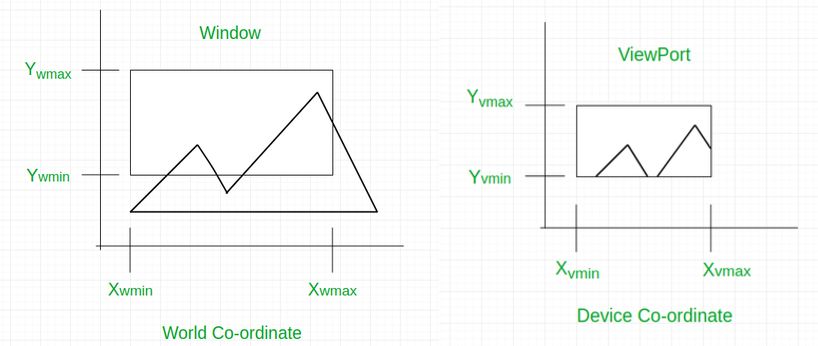
Window to Viewport Transformation is the process of transforming 2D world-coordinate objects to device coordinates. Objects inside the world or clipping window are mapped to the viewport which is the area on the screen where world coordinates are mapped to be displayed.
General Terms:
- World coordinate – It is the Cartesian coordinate w.r.t which we define the diagram, like Xwmin, Xwmax, Ywmin, Ywmax
- Device Coordinate –It is the screen coordinate where the objects are to be displayed, like Xvmin, Xvmax, Yvmin, Yvmax
- Window –It is the area on the world coordinate selected for display.
- ViewPort –It is the area on the device coordinate where graphics is to be displayed.
Bezier curves
A bezier curve is particularly a kind of spline generated from a set of control points by forming a set of polynomial functions.
Discovered by the french engineer Pierre bezier. These functions are computed from the coordinates of the control points.
These curves can be generated under the control of other points. Tangents by using control points are used to generate curves.
Different types of curves are Simple, Quadratic, and Cubic.
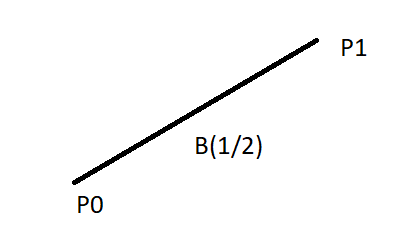
- Simple curve: Simple bezier curve is a straight line from the point.
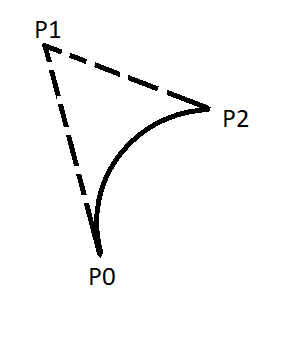
2. Quadratic curve: Quadratic bezier curve is determined by three control points.
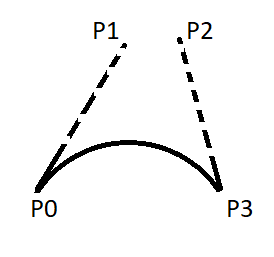
3. Cubic curve: The cubic bezier curve is determined by four control points.
Properties of Bezier Curve:
- Bezier curves are widely available and used in various CAD systems, in general graphics packages such as GL
- The slope at beginning of the curve is along the line joining the first two control points and the slope at the end of the curve is along the line joining the last two points
- Bezier curve always passes through the first and last points i.e p(o)=po, p(1,=pnlie)
- The curves lies entirely within the convex hall formed by the four control points
- The slope at the beginning of the curve is along the line joining the first two control points and the slope at the end of the curve is along the line joining the last two points.
- The degree of polynomial defining the curve segment is one less than the no of defining the polygon.
Multimedia
The word ‘Multimedia’ is a combination of two words, ‘Multi’ and ‘Media’. Multi means many and media means material through which something can be transmitted or send
Multimedia, by definition, is the use of text, audio, video, graphics, and animation to convey information in an engaging and dynamic way.
In other terms, multimedia is a technological way of presenting information that combines audio, video, images, and animations with textual data.
Examples include video conferencing, Yahoo Messenger, email, and the Multimedia Messaging Service ( MMS Service (MMS).
Computer animation
Computer animation is a visual digital display technology that processes the moving images on screen. In simple words, it can be put or defined as the art or power of giving life, energy and emotions etc.read in details
Different types of animation
Traditional animation (also known as cel animation) is hand drawn.
2D Animation is the art of creating movement by combining a sequence of images together in a two-dimensional space.
3D Animation is the art of bringing digital characters, vehicles, props, and full scenes to life in a virtual 3D space.
Motion capture helps enhance the realism of 3D animations. It's used in movies like Avatar and Lord of the Rings and video games like LA Noire and Grand Theft Auto.
Motion graphics animation is how you animate text logos and basic illustrations
bcanotes bca notes bcaquestionpaper
bcanotes bca notes bcaquestionpaper bca questionpaper bcanotes bca notes bcaquestionpaper bca questionpaper bcanotes bca bcanotes bcaquestionpaper bca questionpaper bcanotes bca notes bcaquestionpaper bca questionpaper
bcanotes bca notes bcaquestionpaper bca questionpaperbcanotes bca notes bcaquestionpaper bca questionpaper bcanotes bca notes bcaquestionpaper bca questionpaperbcanotes bca notes bcaquestionpaper bca questionpaper bcanotes bca notes bcaquestionpaper bca questionpaper bcanotes bca notes bcaquestionpaper bca questionpaper bcanotes bca notes bcaquestionpaper bca questionpaper bcanotes bca notes bcaquestionpaper bca questionpaper ccsu ccsunotes ccsu bca cccsu notes ccsubcaquestionpaper bca questionpaperbcanotes
Visit W3Schools.com!Visit W3Schools.com!Visit W3Schools.com!Visit W3Schools.com!Visit W3Schools.com!Visit W3Schools.com!Visit W3Schools.com!Visit W3Schools.com!Visit W3Schools.com!ccsubcanotes ccsu bca cccsu notes ccsubcaquestionpaper bca questionpaperbcanotes ccsubcanotes ccsu bca cccsu notes ccsubcaquestionpaper bca questionpaperbcanotes bcanotes bca notes bcaquestionpaper bca questionpaper
bcanotes bca notes bcaquestionpaper bca questionpaper bcanotes bca notes bcaquestionpaper bca questionpaper bcanotes bca notes bcaquestionpaper bca questionpaper
ccsubcanotes ccsu bca cccsu notes ccsubcaquestionpaper bca questionpaper ccsubcanotes ccsu bca cccsu notes ccsubcaquestionpaper bca questionpaper ccsubcanotes ccsu bca cccsu notes ccsubcaquestionpaper bca questionpaper ccsubcanotes ccsu bca cccsu notes ccsubcaquestionpaper bca questionpaper ccsubcanotes ccsu bca cccsu notes ccsubcaquestionpaper bca questionpaper ccsubcanotes ccsu bca cccsu notes ccsubcaquestionpaper bca questionpaperbcanotes
ccsubcanotes ccsu bca cccsu notes ccsubcaquestionpaper bca questionpaper ccsubcanotes ccsu bca cccsu notes ccsubcaquestionpaper bca questionpaper ccsubcanotes ccsu bca cccsu notes ccsubcaquestionpaper bca questionpaper ccsubcanotes ccsu bca cccsu notes ccsubcaquestionpaper bca questionpaper ccsubcanotes ccsu bca cccsu notes ccsubcaquestionpaper bca questionpaper ccsubcanotes ccsu bca cccsu notes ccsubcaquestionpaper bca questionpaperbcanotes
bcanotes bca notes bcaquestionpaper bca questionpaper bcanotes bca notes bcaquestionpaper bca questionpaper
bcanotes bca notes bcaquestionpaper bca questionpaperbcanotes bca notes bcaquestionpaper bca questionpaper bcanotes bca notes bcaquestionpaper bca questionpaperbcanotes bca notes bcaquestionpaper bca questionpaper bcanotes bca notes bcaquestionpaper bca questionpaper bcanotes bca notes bcaquestionpaper bca questionpaper bcanotes bca notes bcaquestionpaper bca questionpaper bcanotes bca notes bcaquestionpaper bca questionpaper ccsubcanotes ccsu bca cccsu notes ccsubcaquestionpaper bca questionpaperbcanotes
ccsubcanotes ccsu bca cccsu notes ccsubcaquestionpaper bca questionpaperbcanotes ccsubcanotes ccsu bca cccsu notes ccsubcaquestionpaper bca questionpaperbcanotes bcanotes bca notes bcaquestionpaper bca questionpaper
bcanotes bca notes bcaquestionpaper bca questionpaper bcanotes bca notes bcaquestionpaper bca questionpaper bcanotes bca notes bcaquestionpaper bca questionpaper
ccsubcanotes ccsu bca cccsu notes ccsubcaquestionpaper bca questionpaper ccsubcanotes ccsu bca cccsu notes ccsubcaquestionpaper bca questionpaper ccsubcanotes ccsu bca cccsu notes ccsubcaquestionpaper bca questionpaper ccsubcanotes ccsu bca cccsu notes ccsubcaquestionpaper bca questionpaper ccsubcanotes ccsu bca cccsu notes ccsubcaquestionpaper bca questionpaper ccsubcanotes ccsu bca cccsu notes ccsubcaquestionpaper bca questionpaperbcanotes
ccsubcanotes ccsu bca cccsu notes ccsubcaquestionpaper bca questionpaper ccsubcanotes ccsu bca cccsu notes ccsubcaquestionpaper bca questionpaper ccsubcanotes ccsu bca cccsu notes ccsubcaquestionpaper bca questionpaper ccsubcanotes ccsu bca cccsu notes ccsubcaquestionpaper bca questionpaper ccsubcanotes ccsu bca cccsu notes ccsubcaquestionpaper bca questionpaper ccsubcanotes ccsu bca cccsu notes ccsubcaquestionpaper bca questionpaperbcanotes
bcanotes bca notes bcaquestionpaper bca questionpaper bcanotes bca notes bcaquestionpaper bca questionpaper
bcanotes bca notes bcaquestionpaper bca questionpaperbcanotes bca notes bcaquestionpaper bca questionpaper bcanotes bca notes bcaquestionpaper bca questionpaperbcanotes bca notes bcaquestionpaper bca questionpaper bcanotes bca notes bcaquestionpaper bca questionpaper bcanotes bca notes bcaquestionpaper bca questionpaper bcanotes bca notes bcaquestionpaper bca questionpaper bcanotes bca notes bcaquestionpaper bca questionpaper ccsubcanotes ccsu bca cccsu notes ccsubcaquestionpaper bca questionpaperbcanotes
ccsubcanotes ccsu bca cccsu notes ccsubcaquestionpaper bca questionpaperbcanotes ccsubcanotes ccsu bca cccsu notes ccsubcaquestionpaper bca questionpaperbcanotes bcanotes bca notes bcaquestionpaper bca questionpaper
bcanotes bca notes bcaquestionpaper bca questionpaper bcanotes bca notes bcaquestionpaper bca questionpaper bcanotes bca notes bcaquestionpaper bca questionpaper
ccsubcanotes ccsu bca cccsu notes ccsubcaquestionpaper bca questionpaper ccsubcanotes ccsu bca cccsu notes ccsubcaquestionpaper bca questionpaper ccsubcanotes ccsu bca cccsu notes ccsubcaquestionpaper bca questionpaper ccsubcanotes ccsu bca cccsu notes ccsubcaquestionpaper bca questionpaper ccsubcanotes ccsu bca cccsu notes ccsubcaquestionpaper bca questionpaper ccsubcanotes ccsu bca cccsu notes ccsubcaquestionpaper bca questionpaperbcanotes
ccsubcanotes ccsu bca cccsu notes ccsubcaquestionpaper bca questionpaper ccsubcanotes ccsu bca cccsu notes ccsubcaquestionpaper bca questionpaper ccsubcanotes ccsu bca cccsu notes ccsubcaquestionpaper bca questionpaper ccsubcanotes ccsu bca cccsu notes ccsubcaquestionpaper bca questionpaper ccsubcanotes ccsu bca cccsu notes ccsubcaquestionpaper bca questionpaper ccsubcanotes ccsu bca cccsu notes ccsubcaquestionpaper bca questionpaperbcanotes
bcanotes bca notes bcaquestionpaper bca questionpaper bcanotes bca notes bcaquestionpaper bca questionpaper
bcanotes bca notes bcaquestionpaper bca questionpaperbcanotes bca notes bcaquestionpaper bca questionpaper bcanotes bca notes bcaquestionpaper bca questionpaperbcanotes bca notes bcaquestionpaper bca questionpaper bcanotes bca notes bcaquestionpaper bca questionpaper bcanotes bca notes bcaquestionpaper bca questionpaper bcanotes bca notes bcaquestionpaper bca questionpaper bcanotes bca notes bcaquestionpaper bca questionpaper ccsubcanotes ccsu bca cccsu notes ccsubcaquestionpaper bca questionpaperbcanotes
ccsubcanotes ccsu bca cccsu notes ccsubcaquestionpaper bca questionpaperbcanotes ccsubcanotes ccsu bca cccsu notes ccsubcaquestionpaper bca questionpaperbcanotes bcanotes bca notes bcaquestionpaper bca questionpaper
bcanotes bca notes bcaquestionpaper bca questionpaper bcanotes bca notes bcaquestionpaper bca questionpaper bcanotes bca notes bcaquestionpaper bca questionpaper
ccsubcanotes ccsu bca cccsu notes ccsubcaquestionpaper bca questionpaper ccsubcanotes ccsu bca cccsu notes ccsubcaquestionpaper bca questionpaper ccsubcanotes ccsu bca cccsu notes ccsubcaquestionpaper bca questionpaper ccsubcanotes ccsu bca cccsu notes ccsubcaquestionpaper bca questionpaper ccsubcanotes ccsu bca cccsu notes ccsubcaquestionpaper bca questionpaper ccsubcanotes ccsu bca cccsu notes ccsubcaquestionpaper bca questionpaperbcanotes
ccsubcanotes ccsu bca cccsu notes ccsubcaquestionpaper bca questionpaper ccsubcanotes ccsu bca cccsu notes ccsubcaquestionpaper bca questionpaper ccsubcanotes ccsu bca cccsu notes ccsubcaquestionpaper bca questionpaper ccsubcanotes ccsu bca cccsu notes ccsubcaquestionpaper bca questionpaper ccsubcanotes ccsu bca cccsu notes ccsubcaquestionpaper bca questionpaper ccsubcanotes ccsu bca cccsu notes ccsubcaquestionpaper bca questionpaperbcanotes